


本文由 gwozai 整理。Microsoft Store 包名是 OpenAI.Codex。任务管理器显示 ChatGPT,子进程名是 Codex。安装状态经常是 Ok,卸载重装无效——问题在启动,不在安装。
适用版本:26.820 / 26.825 / 26.901 / 26.908 等商店稳定版。
现象
双击后没有窗口,任务栏、Alt+Tab 也没有。
任务管理器搜
chatgpt:在「后台进程」里一组 ChatGPT / Codex(5~6 个)。主进程 CPU 一直涨(几十到几百秒),内存大约 400MB+,网络经常是 0。
连点图标、重装商店版,都还是这样。
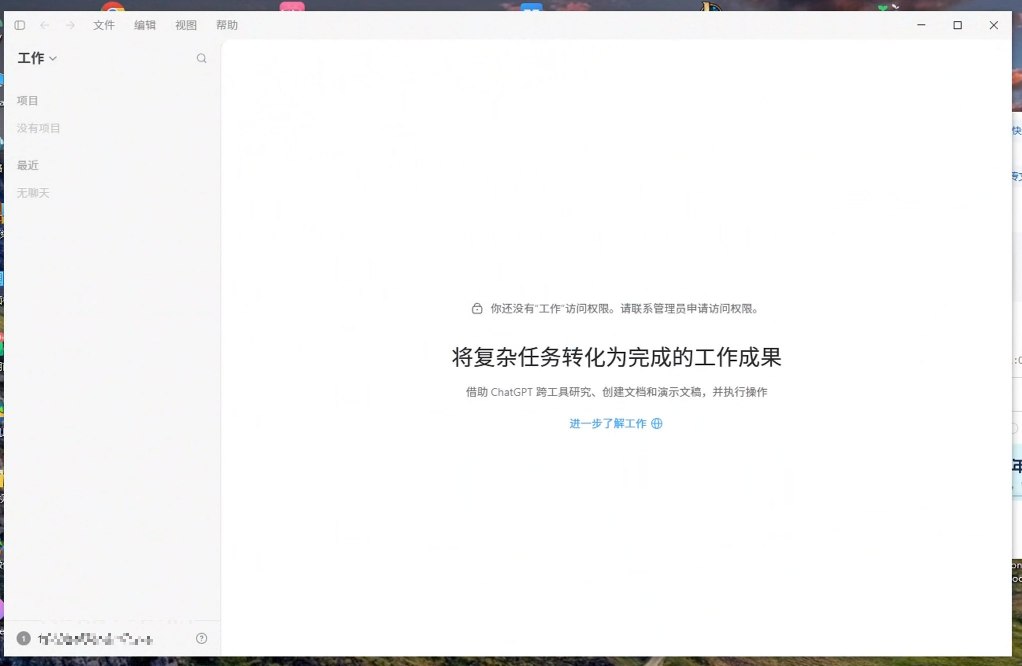
如果已经弹出 ChatGPT 主界面(哪怕提示没有「工作」访问权限),说明窗口已经起来了,不是本文问题。不要跑下面的 xcopy / Beta。工作权限找 ChatGPT 工作区管理员开通,和 Windows 启动无关。
根因(两层经常一起出现)
应用内更新策略堵住启动
日志有
in_app_updates_policy_wait_started timeoutMs=300000,且enableUpdater=true。主进程先等更新策略,最长约 5 分钟。中途结束任务再开会把计时清零。cua_node从商店包拷到用户目录失败WindowsApps里的文件带 Application Protected / EFS。普通拷贝写到%LOCALAPPDATA%\OpenAI\Codex\runtimes\cua_node会失败或半途停下。每次启动新建.staging-<hash>-<随机>,升不成正式目录<hash>。没有--type=renderer,MainWindowHandle全是0。
商店升级后,旧 hash 目录作废,必须按最新 .staging-* 再拷一次。
不要做的事
不要连点桌面图标。每点一次多一个
.staging-*。不要在日志只有 2~3 行时反复结束任务再开。
不要只卸稳定版再装同一条版本线,问题会原样回来。
不要把
%LOCALAPPDATA%\Packages\...直接贴进 PowerShell。那是资源管理器路径。不要把
PS C:\Users\...>提示符一起粘贴,会报「找不到进程」。
处理顺序
普通 PowerShell 跑「一、诊断」。
管理员 PowerShell 跑「二、修一轮」。只启动一次。
等 20~30 秒,跑「确认修好没有」。
仍无
renderer:装 Beta,打开 ChatGPT (Beta),不要点旧快捷方式。应急:浏览器 https://chatgpt.com
一、诊断(普通 PowerShell)
不必管理员。整段粘贴,把从 === 1. 到日志末尾留下来对照。
Write-Host '=== 1. 包 ==='
Get-AppxPackage OpenAI.Codex* | Format-List Name,Version,Status,InstallLocation

Write-Host '=== 2. 环境变量 ==='
[Environment]::GetEnvironmentVariable('CODEX_SPARKLE_ENABLED','User')

Write-Host '=== 3. 窗口句柄 ==='
Get-Process ChatGPT,Codex -EA SilentlyContinue |
  Select Id,CPU,Responding,MainWindowHandle | Format-Table -AutoSize

Write-Host '=== 4. 子进程类型 ==='
Get-CimInstance Win32_Process -Filter "Name='ChatGPT.exe'" -EA SilentlyContinue |
  Select ProcessId,@{n='Type';e={
    if ($_.CommandLine -match '--type=(\S+)') { $Matches[1] }
    elseif ($_.CommandLine -match 'ChatGPT.exe"$') { 'main' }
    else { 'other' }
  }} | Format-Table -AutoSize

Write-Host '=== 5. 运行时解压 ==='
Get-ChildItem "$env:LOCALAPPDATA\OpenAI\Codex\runtimes\cua_node" -Force -EA SilentlyContinue |
  Select Name,LastWriteTime | Format-Table -AutoSize

Write-Host '=== 6. 最新日志 ==='
$log = Get-ChildItem "$env:LOCALAPPDATA\Packages\OpenAI.Codex_*\LocalCache\Local\Codex\Logs" `
  -Recurse -Filter 'codex-desktop*.log' -EA SilentlyContinue |
  Sort LastWriteTime -Desc | Select -First 1
if ($log) {
  "LOG=$($log.FullName)"
  "TIME=$($log.LastWriteTime)"
  Get-Content -LiteralPath $log.FullName -Tail 15
} else {
  '没有找到日志,可能还没启动过'
}
怎么读
盯日志(可选):
$log = Get-ChildItem "$env:LOCALAPPDATA\Packages\OpenAI.Codex_*\LocalCache\Local\Codex\Logs" -Recurse -Filter "codex-desktop*.log" |
  Sort LastWriteTime -Desc | Select -First 1
Get-Content -LiteralPath $log.FullName -Wait -Tail 20
Ctrl+C 停止。一直只有那几行,说明启动卡死。
二、修一轮(管理员 PowerShell)
窗口标题必须是 管理员: Windows PowerShell。确认诊断是「包 Ok + 无窗口 + 无 renderer」再跑。关掉更新器,用 xcopy /G 把 cua_node 拷到正式 hash 目录,只启动一次。hash 从最新 .staging-* 自动取。
Get-Process ChatGPT,Codex -EA SilentlyContinue | Stop-Process -Force

[Environment]::SetEnvironmentVariable('CODEX_SPARKLE_ENABLED','false','User')
$env:CODEX_SPARKLE_ENABLED = 'false'

$pkg = Get-AppxPackage OpenAI.Codex
$src = Join-Path $pkg.InstallLocation 'app\resources\cua_node'
$root = "$env:LOCALAPPDATA\OpenAI\Codex\runtimes\cua_node"
$stg = Get-ChildItem $root -Force -Directory -EA SilentlyContinue |
  Where-Object { $_.Name -like '.staging-*' } |
  Sort-Object LastWriteTime -Descending |
  Select-Object -First 1
if (-not $stg) { throw '没有 .staging-* 目录。先正常启动一次 ChatGPT,再跑诊断。' }
$hash = ($stg.Name -replace '^\.staging-','' -replace '-.*$','')
$dest = Join-Path $root $hash
New-Item -ItemType Directory -Force -Path $dest | Out-Null

"SRC=$src"
"DEST=$dest"
"HASH=$hash"
if (-not (Test-Path $src)) { throw '读不了商店包目录,请用管理员 PowerShell 再跑。' }
cmd /c "xcopy `"$src`" `"$dest\`" /E /I /Y /G"

explorer.exe "shell:AppsFolder\OpenAI.Codex_2p2nqsd0c76g0!App"
xcopy /G才能从受保护的商店包拷出。不要改成Copy-Item。成功标志:
复制了 xxxx 个文件(常见约 4683,随版本变)。拷完等 20~30 秒,看桌面 / Alt+Tab。不要连点图标。
确认修好没有
Test-Path (Join-Path "$env:LOCALAPPDATA\OpenAI\Codex\runtimes\cua_node" (
  (Get-ChildItem "$env:LOCALAPPDATA\OpenAI\Codex\runtimes\cua_node" -Force -Directory |
    Where-Object { $_.Name -notlike '.*' } |
    Sort-Object LastWriteTime -Descending |
    Select-Object -First 1
  ).Name
) | ForEach-Object { Join-Path $_ 'bin\node_repl.exe' })
Get-CimInstance Win32_Process -Filter "Name='ChatGPT.exe'" |
  Where-Object { $_.CommandLine -match 'renderer' } |
  Select ProcessId
Get-Process ChatGPT -EA SilentlyContinue |
  Select Id,CPU,MainWindowHandle | Format-Table -AutoSize
或手工把诊断里的 hash 填进去:
Test-Path "$env:LOCALAPPDATA\OpenAI\Codex\runtimes\cua_node\<hash>\bin\node_repl.exe"
Get-CimInstance Win32_Process -Filter "Name='ChatGPT.exe'" |
  Where-Object { $_.CommandLine -match 'renderer' } |
Select ProcessId拷完仍无窗口:只重启一次
Get-Process ChatGPT,Codex -EA SilentlyContinue | Stop-Process -Force
explorer.exe "shell:AppsFolder\OpenAI.Codex_2p2nqsd0c76g0!App"
不要再 xcopy,不要连点。
三、还不行:官方 Beta
26.901.6511 等版本上,文件拷齐也经常出不了窗口。
Get-Process ChatGPT,Codex -EA SilentlyContinue | Stop-Process -Force
winget install --id 9N8CJ4W95TBZ --source msstore --accept-source-agreements --accept-package-agreements
开始菜单打开 ChatGPT (Beta),不要点原来的稳定版快捷方式。
360、Clash 系统代理有时会拦 Electron。可先加白名单或关代理再试一次。
四、卸载(真要重装时)
只卸包、不修运行时,同一版本重装后问题会回来。
Get-Process ChatGPT,Codex -ErrorAction SilentlyContinue | Stop-Process -Force
Get-AppxPackage -Name OpenAI.Codex* | ForEach-Object { Remove-AppxPackage -Package $_.PackageFullName }
@(
  "$env:LOCALAPPDATA\OpenAI\Codex",
  "$env:LOCALAPPDATA\OpenAI\ChatGPT"
) + @(Get-ChildItem "$env:LOCALAPPDATA\Packages" -Directory -EA SilentlyContinue |
      Where-Object { $_.Name -like 'OpenAI.Codex*' }).FullName |
  Where-Object { $_ -and (Test-Path $_) } |
  ForEach-Object { Remove-Item -LiteralPath $_ -Recurse -Force -EA SilentlyContinue }
if (Get-AppxPackage OpenAI.Codex*) { '还没卸干净' } else { '卸载完成,可以重装了。' }
路径
窗口出来后,.staging-* 可以删。
现场记录(hash 随版本变,脚本会自动取)
参考
更新器挡住窗口:openai/codex#41073
更新策略等待 300s:openai/codex#41339
cua_node/node_repl.exe受保护拷贝失败:openai/codex#41540后台进程无 UI:openai/codex#41075
需要 ChatGPT 会员?
我可以帮你充值 ChatGPT 会员。有需要直接加微信:lz1834344,找 gwozai。